Each service type (Gas, Electrical, Oil, Commercial Gas) has its own dashboard with an overall view of all the properties that contain compliance data (e.g. Appliances/Property checks), and all the properties that need action to be taken on them to remain compliant.
The dashboard can also be filtered down by landlord as with the Compliance Overview page, however, the individual analytics dashboards can be filtered by date as well. To do this enter a date in the from and to fields at the top of the page.
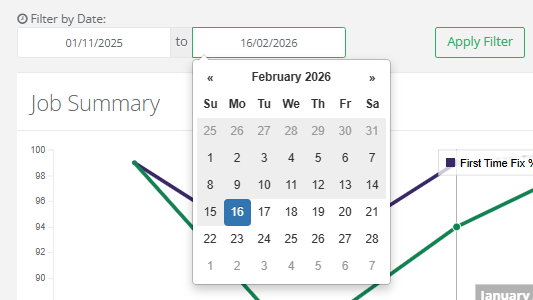
Clicking on the fields will bring up a calendar to select the dates from or they can be entered manually. Once this has been done, select Apply Filter to filter the dashboard.
Service dashboards also have unique widgets that give further insight into the service type. These include:
- Job Summary
- Key Statistics
- No Access Reasons
- Property Overview
- Customer Satisfaction
- Attention Pending
- Engineer Performance
More can be found out about these features here.
Was this article helpful?
That’s Great!
Thank you for your feedback
Sorry! We couldn't be helpful
Thank you for your feedback
Feedback sent
We appreciate your effort and will try to fix the article