This allows you to customise text messages sent to clients. You can do this by going to Settings > Company Settings > Text Message Settings.
_____________________________________________________________________________________________________________________________________
Engineer-On-Way Texts
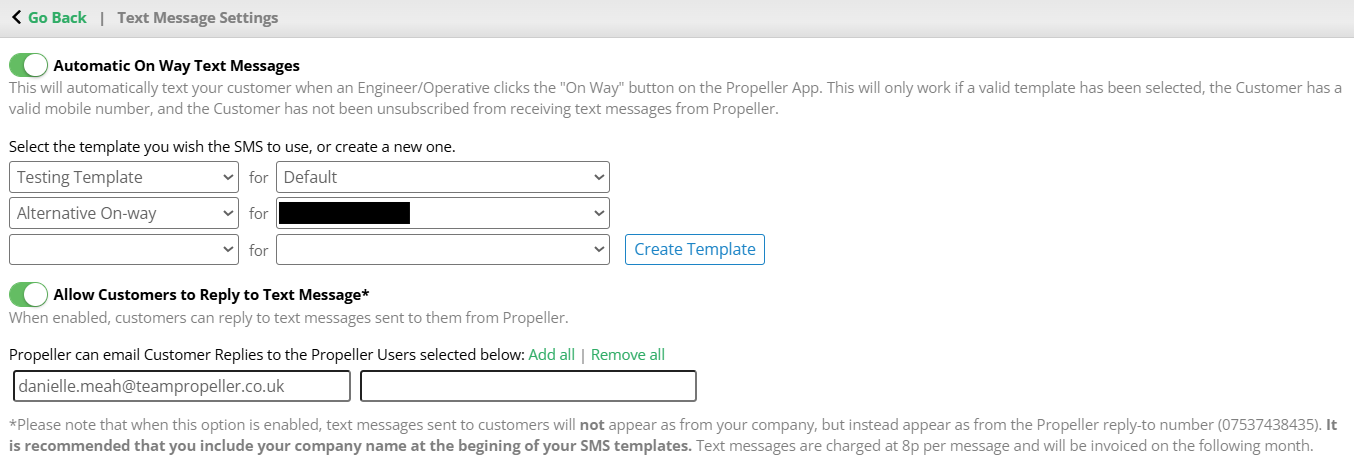
Here you can manage how you alert a customer that an engineer is on the way to their property. At the top you can toggle whether or not you would like the customer to be automatically notified. This means that when an engineer selects "On my Way" on the app the chosen text message will be sent out to the customer.

If this is selected, you can then choose which text template to use. Select the drop down to select a template. In the second drop down you can assign the template to specific landlords. Multiple templates can be selected and assigned to a different combination of landlords.
If you would like to create a new template to use select Create New. This will take you to the template creation screen. Alternatively, you can manage your templates via the Template Manager.

_____________________________________________________________________________________________________________________________________
Text Message Replies
You can enable your customers to respond to the text messages your company sends. Simply toggle the below option On.

You can also choose to notify Propeller users when a customer replies. Select Add all to make all your users be notified. Alternatively, enter the email addresses of the users you would like to alert in the boxes below.

Please Note: When this option is enabled, text messages sent to customers will not appear as from your company, but instead appear as from the Propeller reply-to number (07537438435). It is recommended that you include your company name at the beginning of your SMS templates. Text messages are charged at 8p per message and will be invoiced on the following month.
Was this article helpful?
That’s Great!
Thank you for your feedback
Sorry! We couldn't be helpful
Thank you for your feedback
Feedback sent
We appreciate your effort and will try to fix the article