To send bulk visit reminders, navigate to Communications > Visit Communications.
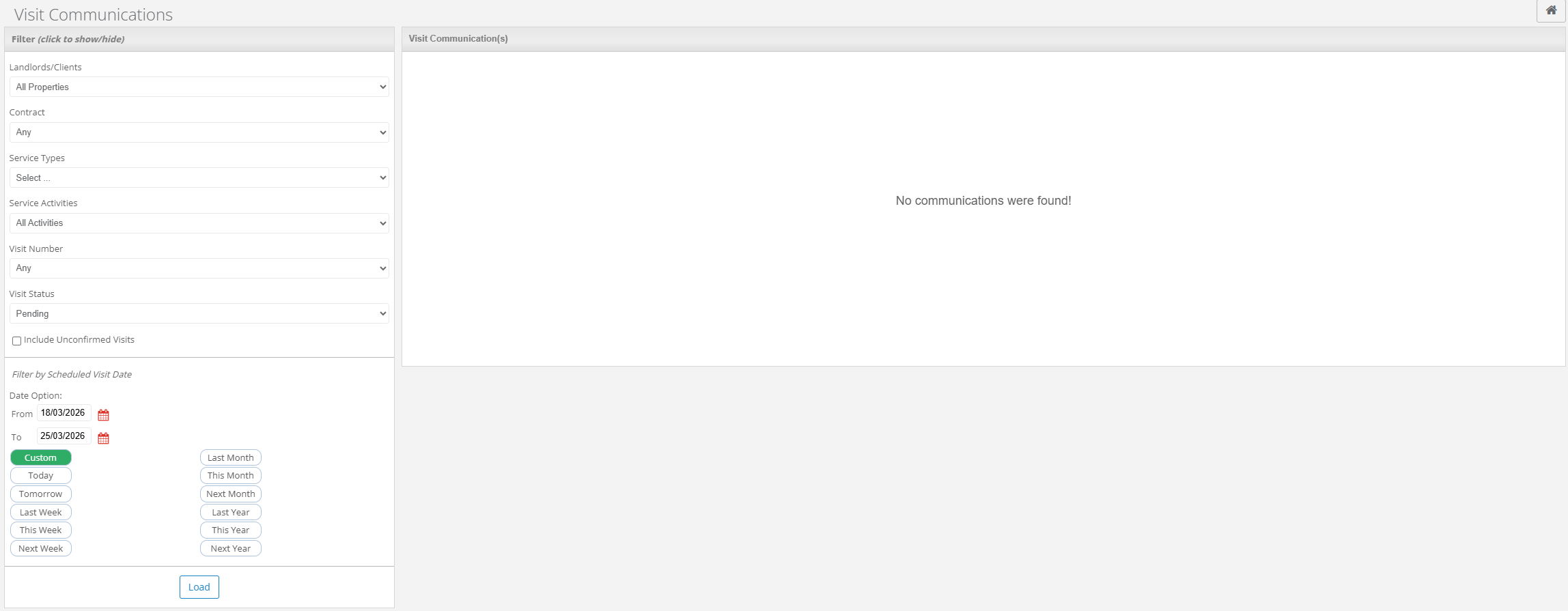
Here you can filter the visits you would like to send the reminders for. You can filter by the following:
- Landlords/Clients
- Contract
- Service Types
- Service Activities
- Visit Number
- Visit Status
- Date
You can also choose to include unconfirmed visits.
Once you have entered the required visits, select Load. You will be able to view the list of the visits that meet the filter requirements on the right of the screen.

There will then be an option to send the reminder via email and/or letter. You can select/deselect these by clicking the Yes/No button on the corresponding options.
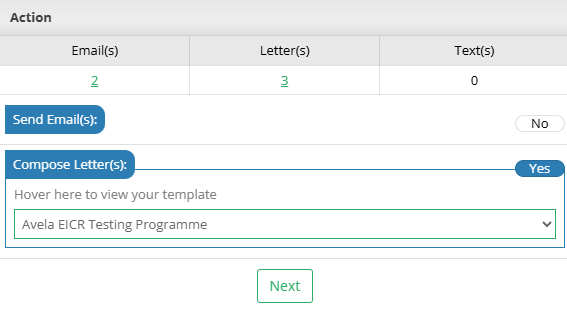
Make sure Compose Letter(s) is set to Yes to send by postal. You can then select the template you would like to use in the drop down. More about templates can be found here.
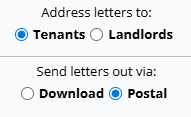
Select Next when the correct template has been chosen, and then choose to send the letters out via Postal. Select Next again.
Select Process Now. Alternatively, select Abort to cancel.

This will then provide the Quote Information regarding the letters you would like to send. This will detail how many letters and how much it will cost.

If you are happy with this select Continue to confirm. You will then be notified if the letters are sent successfully. Any letters sent out will be tracked in the individual property/visit Notepad.
Was this article helpful?
That’s Great!
Thank you for your feedback
Sorry! We couldn't be helpful
Thank you for your feedback
Feedback sent
We appreciate your effort and will try to fix the article