A missed visit occurs when a scheduled engineer visit cannot be completed because the assigned engineer is unable to arrive at the landlords location home or site at the scheduled time.
_____________________________________________________________________________________________________________________________________
What is Considered a Missed Visit?
A visit may be marked as missed when the engineer cannot attend due to reasons such as:
Customer location was inaccessible (e.g. locked gate, no entry access)
Incorrect or incomplete address information
Customer not present to provide access
Vehicle issues
Other
When a visit is missed, it’s important to clearly note what happened. This includes recording the scheduled date and time, the location, the engineer assigned, any attempts to contact the customer, and the reason the visit couldn’t be completed. Keeping these details helps everyone understand what occurred and ensures the process stays transparent and consistent.
_____________________________________________________________________________________________________________________________________
Missed Visits
If a visit has been missed, this will be detailed in the Status section of the job. Alongside the status will be the number of times the visit has been missed.
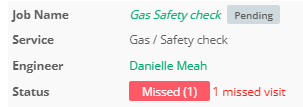
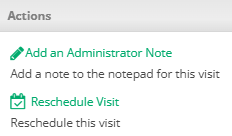
You will be able to reschedule this missed visit in the Actions box on the visit.
The details regarding the missed visit can be found in the Notepad section.

_____________________________________________________________________________________________________________________________________
Marking a Missed Visit (Website)
Navigate to the visit that has been missed. From here, select the Mark as Missed option in the Actions box.

From here you will be prompted to enter the missed visit reason as well as any additional comments.
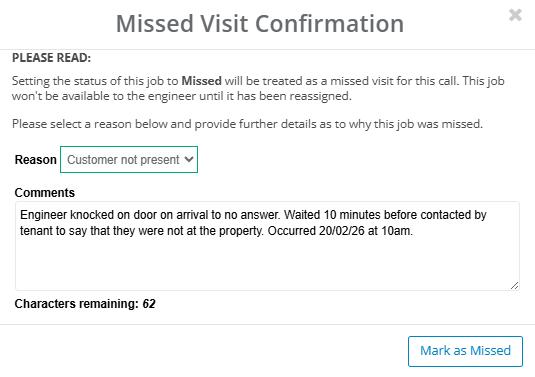
Once the details have been entered, select Mark as Missed. The comments you have made regarding the missed visit reason will appear in the Notepad section of the job.

_____________________________________________________________________________________________________________________________________
Marking a Missed Visit (App)
An engineer can mark a visit as missed by selecting the Mark as Missed Visit button on the bottom toolbar on their app.

Before confirming a visit as Missed, a message will appear prompting the engineer to provide a reason. This makes it mandatory to explain why the visit could not be completed. There are many possible reasons for a missed visit and it is essential that the engineer provides this information.
Adding a comment also allows the engineer to explain in detail what happened and share their perspective. This makes sure that there is transparency and helps the team understand the full context of the missed visit.
Engineers are also able to add photos of the missed visit, as well as reschedule the visit at the time of marking it as missed (if they have permission to do so).
An example of this on the propeller app using an IOS device is shown down below:
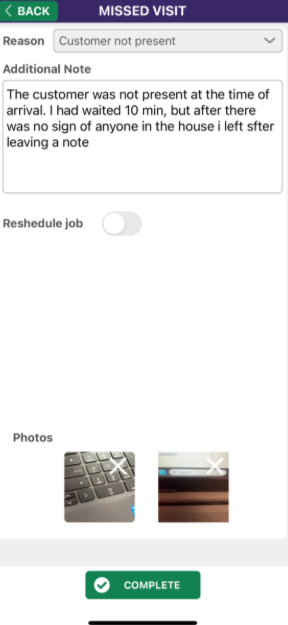
In this image there is a reason for the missed visit as well as the additional notes down below. Furthermore there are 2 photos that have to be taken which will store time/date and location data if enabled.
_____________________________________________________________________________________________________________________________________
Final Steps
After a missed visit, the visit status is updated in the system and the customer is informed. Next steps like rescheduling the visit or taking other appropriate actions are then arranged. If missed visits happen repeatedly, individuals can review them to spot patterns and find ways to make scheduling, access and communication smoother for everyone.
Was this article helpful?
That’s Great!
Thank you for your feedback
Sorry! We couldn't be helpful
Thank you for your feedback
Feedback sent
We appreciate your effort and will try to fix the article